





本站用的是Mashiro大佬的Sakura主题,这个主题没有类似微博这样的说说模块,于是决定自己增加一个。
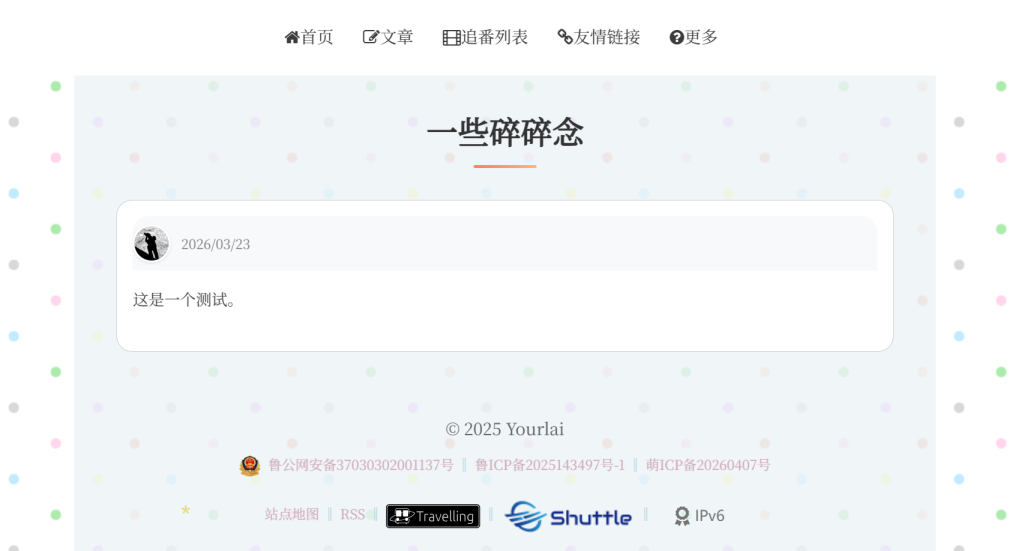
效果如图,也可以进链接看看:碎碎念 -Yourlai's Blog
理论上来说,本教程适用于所有的WordPress站点,有需要的各位可以参考一下。
当然,css部分根据我的主题进行了自定义,其他主题无法保证正常显示~
1、在function.php中增加代码
大概原理就是:利用 WordPress 的自定义文章类型功能,创建一个全新的内容发布模块,名为“说说”。就像在 WordPress 中增加了一种新的“文章”类别,与默认的“文章(Posts)”和“页面(Pages)”并列。
// --- Start of Shuoshuo Functionality ---
// 注册自定义文章类型 'shuoshuo'
add_action('init', 'my_custom_init_for_shuoshuo');
function my_custom_init_for_shuoshuo()
{
    $labels = array(
        'name'               => '说说',
        'singular_name'      => '说说',
        'add_new'            => '发表说说',
        'add_new_item'       => '发表说说',
        'edit_item'          => '编辑说说',
        'new_item'           => '新说说',
        'view_item'          => '查看说说',
        'search_items'       => '搜索说说',
        'not_found'          => '暂无说说',
        'not_found_in_trash' => '没有已遗弃的说说',
        'menu_name'          => '说说'
    );
    $args = array(
        'labels'             => $labels,
        'public'             => true,
        'publicly_queryable' => true,
        'show_ui'            => true,
        'show_in_menu'       => true,
        'query_var'          => true,
        'rewrite'            => array( 'slug' => 'shuoshuo' ),
        'capability_type'    => 'post',
        'has_archive'        => true,
        'hierarchical'       => false,
        'menu_position'      => null,
        'supports'           => array( 'title', 'editor', 'author', 'thumbnail' ) // 支持标题、内容、作者、特色图像
    );
    register_post_type( 'shuoshuo', $args );
}
// --- End of Shuoshuo Functionality ---
2、在后台中看到“说说”后进行下一步

3、增加一个shuoshuo.php模板
记得把代码中的头像地址改一下~
<?php
/*
Template Name: 说说
Description: 用于展示碎碎念和吐槽
*/
get_header();
?>

<style>
    /* --- 默认浅色模式样式 --- */

    /* 全局容器 */
    .main-content {
        margin: 30px auto;
        padding: 0 20px;
    }

    /* 标题样式 */
    h2.page-title {
        text-align: center;
        color: #333; /* 浅色模式下的颜色 */
        margin-bottom: 30px;
        font-size: 2em;
        position: relative;
    }

    h2.page-title::after {
        content: '';
        display: block;
        width: 60px;
        height: 3px;
        background: linear-gradient(to right, #ff7e5f, #feb47b);
        margin: 10px auto;
        border-radius: 2px;
    }

    /* 说说列表容器 */
    .shuoshuo-container {
        display: flex;
        flex-direction: column-reverse; /* 最新的在最上面 */
        gap: 20px;
    }

    /* 单个说说卡片 - 统一在此处设置边框和圆角 */
    .shuoshuo-item {
        background-color: white; /* 浅色模式下的背景 */
        border-radius: 15px; /* 统一的圆角大小 */
        border: 1px solid #ccc; /* 浅色模式下的边框 */
        overflow: hidden; /* 圆角效果 */
        transition: transform 0.2s ease, box-shadow 0.2s ease, background-color 0.3s ease, border-color 0.3s ease;
    }

    .shuoshuo-item:hover {
        transform: translateY(-3px);
        box-shadow: 0 6px 20px rgba(0, 0, 0, 0.1); /* 浅色模式下的阴影 */
    }

    /* 内容区域 */
    .shuoshuo-content {
        padding: 15px;
        line-height: 1.6;
        color: #444; /* 浅色模式下的文字颜色 */
    }

    /* 头部信息容器 */
    .shuoshuo-header {
        display: flex;
        align-items: center;
        gap: 10px; /* 头像和日期之间的间距 */
        margin-bottom: 15px; /* 与正文之间的间距 */
        background-color: #f8f9fa; /* 浅色模式下的浅灰色背景 */
        padding: 8px 0; /* 上下内边距 */
        border-radius: 15px 15px 0 0; /* 顶部圆角 */
    }

    /* 头像 */
    .shuoshuo-avatar {
        width: 36px;
        height: 36px;
        border-radius: 50%;
        object-fit: cover;
        border: 2px solid white; /* 浅色模式下的头像边框 */
        box-shadow: 0 1px 3px rgba(0, 0, 0, 0.1); /* 浅色模式下的头像阴影 */
    }

    /* 日期 */
    .shuoshuo-time {
        font-size: 0.85em;
        color: #888; /* 浅色模式下的日期颜色 */
        margin: 0; /* 移除默认的段落外边距 */
    }

    /* 正文内容 */
    .shuoshuo-text {
        margin: 0;
        color: #4c4c4c; /* 修正了原代码中的错误值 #4c4c4c4 */
    }


    /* --- 手动深色模式样式 --- */
    /* 当 body 标签有 'dark' 类时,应用以下深色主题 */
    body.dark .main-content {
        background-color: #00000000; /* 深色背景 */
    }

    body.dark h2.page-title {
        color: #e0e0e0; /* 深色模式下的标题颜色 */
    }

    body.dark .shuoshuo-item {
        background-color: #2d2d2d; /* 深色模式下的卡片背景 */
        border-color: #444; /* 深色模式下的边框 */
        color: #e0e0e0; /* 深色模式下的文字颜色 */
    }

    body.dark .shuoshuo-item:hover {
        box-shadow: 0 6px 20px rgba(0, 0, 0, 0.3); /* 深色模式下更明显的阴影 */
    }

    body.dark .shuoshuo-content {
        color: #e0e0e0; /* 深色模式下的内容文字颜色 */
    }

    body.dark .shuoshuo-header {
        background-color: #3a3a3a; /* 深色模式下的头部背景 */
    }

    body.dark .shuoshuo-time {
        color: #aaa; /* 深色模式下的日期颜色 */
    }

    body.dark .shuoshuo-text {
        color: #e0e0e0; /* 深色模式下的正文颜色 */
    }

    body.dark .shuoshuo-avatar {
        border-color: #2d2d2d; /* 深色模式下头像的边框色 */
        box-shadow: 0 1px 3px rgba(0, 0, 0, 0.3); /* 深色模式下的头像阴影 */
    }
</style>

<div class="main-content">
    <h2 class="page-title">一些碎碎念</h2>
    <div class="shuoshuo-container">
        <?php
        // 查询所有 'shuoshuo' 类型的文章
        $shuoshuo_query = new WP_Query(array(
            'post_type' => 'shuoshuo',
            'post_status' => 'publish',
            'posts_per_page' => -1,
            'orderby' => 'date',
            'order' => 'DESC'
        ));

        if ($shuoshuo_query->have_posts()) :
            while ($shuoshuo_query->have_posts()) : $shuoshuo_query->the_post();
                // 获取文章作者的头像
                $author_avatar = '<img src="这里填你的头像地址" alt="头像" class="shuoshuo-avatar">';
        ?>
            <article id="shuoshuo-<?php the_ID(); ?>" class="shuoshuo-item">
                <div class="shuoshuo-content">
                    <div class="shuoshuo-header">
                        <?php echo $author_avatar; ?>
                        <span class="shuoshuo-time"><?php echo get_the_date('Y/m/d'); ?></span>
                    </div>
                    <!-- 正文内容 -->
                    <p class="shuoshuo-text"><?php the_content(); ?></p>
                </div>
            </article>
        <?php
            endwhile;
            wp_reset_postdata();
        else :
            echo '<p style="text-align: center; color: #888;">暂无说说,快来说点什么吧~</p>';
        endif;
        ?>
    </div>
</div>
<?php get_footer(); ?>
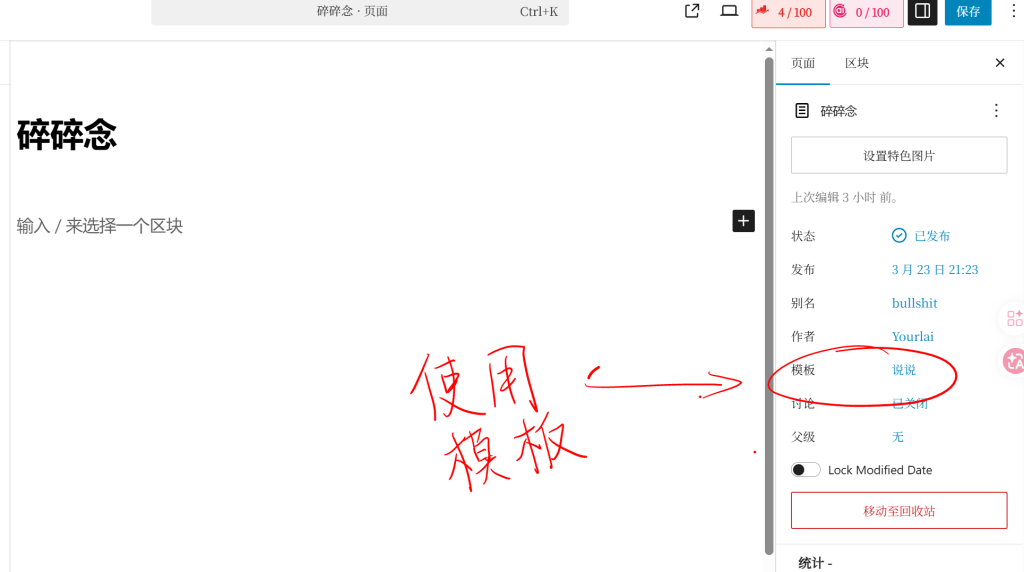
4、新建页面,使用“说说”模板




Comments | NOTHING